Automate,
Protect, and Stay
Ahead of Threats

Patching isn't just an IT task—it's your first line of defense. ZServiceDesk helps enterprises automatically detect, deploy, and manage patches across all major platforms with precision, control, and compliance built in.


ZServiceDesk Patch Management platform showing Windows, macOS and Linux patch status and compliance tracking Patch management overview overlay showing automated security patching workflow
Windows operating system supported for patch management
macOS operating system supported for patch management
Linux operating system supported for patch management

All Major OS Supported (Windows, macOS, Linux)

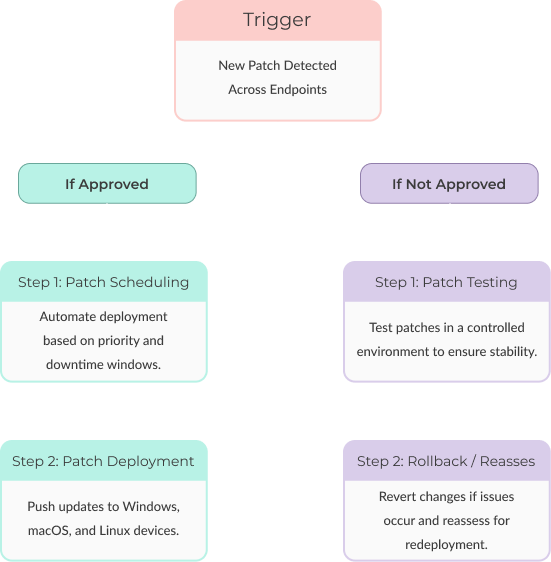
ZServiceDesk Patch Management process illustration showing discovery, deployment, testing and rollback workflow

What Is Patch
Management?

Patch Management is the process of identifying, acquiring, testing, and installing software updates—or "patches"—across systems, applications, and devices. These patches fix security vulnerabilities, improve performance, and add new features.

With cyber threats growing more sophisticated, consistent patching is no longer optional—it's essential. Whether it's a Windows server, a macOS laptop, or a Linux database, ZServiceDesk ensures every endpoint is up to date, secured, and audit-ready.

EXPLORE FEATURES

The Risk Without It

Organizations that lack proper patching processes face major challenges:

  • Known vulnerabilities remain open — leaving systems exposed
  • Compliance audits fail due to missing updates
  • Ransomware attacks increase with unpatched software
  • Operational disruptions occur due to buggy, outdated software
  • Manual efforts waste time and often result in patching delays or errors

How ZServiceDesk Solves It

ZServiceDesk's Patch Management module empowers your IT team to manage updates across the enterprise—automatically, intelligently, and securely.

Discover

Detect Missing Patches

Auto-scan devices for OS, driver, and software patches—including critical security, bug fix, and feature updates.
Bug icon representing deeper discovery of vulnerabilities and missing patches

Deeper Discovery

Go beyond surface-level scans—get granular visibility into patch versions, dependencies, and vulnerabilities.
Deploy

Patch approval workflow security and virus protection icon
Patch approval risk assessment and vulnerability icon
Patch approval workflow guide and documentation icon
Patch approval schedule and time management icon
Patch approval customization and settings icon

Patch Approval Workflows

Streamline your patch approvals with intelligent automation and granular control.

Rocket icon representing fast and automated patch deployment
Time schedule icon for patch deployment timing and scheduling

Update Schedule

12:00 PM
Risk assessment icon for patch deployment scheduling

Update Schedule

11:00 PM
Security shield icon for protected patch deployment

Update Schedule

09:30 AM
Guide icon for patch deployment scheduling guidance

Update Schedule

09:00 AM

Flexible Patch Deployment

Deploy updates instantly or schedule by time zone, department, or user activity to reduce business impact.

Patch rollback security shield and keyhole icon
Patch rollback laptop refresh and restore icon
Patch rollback bug fix and testing icon
Patch rollback customization and settings icon
Patch rollback refresh and restore to previous version icon

Patch Testing & Rollback

Test patches in sandboxed environments before rollout, and roll them back safely if any issues occur.

Govern

Rules for different level of risks

Different levels of risk are typically categorized as low, medium, and high, with some systems using more granular classifications.

NOW

Rules created for Asset type

Creating rules for asset types involves defining how an asset behaves or is managed.

NOW

New Rule for Department

New rules or updates for a specific department can vary significantly depending on the department.

NOW

Customizable Patch Policies

Apply tailored patching rules based on OS, department, asset type, or risk level.

Windows devices patch status showing 24 out of 30 devices patched (80% compliance)

Windows Devices
24/30 Patched

80
macOS devices patch status showing 15 out of 15 devices patched (100% compliance)

macOS Devices
15/15 Patched

100
Linux devices patch status showing 8 out of 20 devices patched (40% compliance)

Linux Devices
8/20 Patched

40

Cross-Platform Support

Patch devices running Windows, macOS, and Linux — all from a unified interface.

Compliance audit reports folder overlay showing documentation management
Audit reports generated icon showing 37 downloadable compliance reports

Audit Reports Generated

37 reportsDownloadable reports for compliance review

Patch logs tracked icon showing 1,532 actions logged

Patch Logs Tracked

1,532 actions loggedEvery patch event recorded with timestamp and status

Log retention period icon showing 12 months retention

Log Retention Period

12 MonthsHistorical logs securely stored for audits

Compliance coverage icon showing 4 standards met

Compliance Coverage

4 Standards MetSOC 2, ISO 27001, HIPAA, GDPR
AI-driven automation for patch management central hub icon
AI brain chip icon for intelligent patching decisions
Fraud detection and threat monitoring icon
Integration icon for AI-driven automation with ITSM

Key Metrics You Can
Track

Patch compliance rate by OS or department
Number of critical patches deployed this month
Devices with overdue patches
Average patch deployment time

Patch management key metrics dashboard showing compliance rate, critical patches deployed, and deployment time analytics
ZServiceDesk Patch Management enterprise features and benefits illustration

Why Enterprises
Choose ZServiceDesk
for Patch Management

ZServiceDesk provides an end-to-end patching ecosystem that simplifies the complex. With its comprehensive workflows, automated scheduling, and AI-powered intelligence, your IT team can ensure every system is secure without constant micromanagement.

Whether you're managing 500 or 50,000 endpoints, ZServiceDesk scales with your needs, reduces your exposure, and helps you stay always-on and audit-ready.

Explore What's Next with ZServiceDesk

Supercharge your operations with advanced modules designed for scale, security, and seamless execution:

Enterprise Service Management

Automate updates and fix vulnerabilities

View More

Asset Management

Track all IT & non-IT assets with lifecycle intelligence

View More

Project Management

Track progress and meet deadlines with ease.

View More